
Time is measured using different units.
You can convert the time measured in one unit to another unit by clicking Utilities and then Conversions.
Holding the Control key and typing q has the same result.
In the Conversions window, select Time. If you can't see the word Time
in the Measurement Type box, hit the  arrow key a few times.
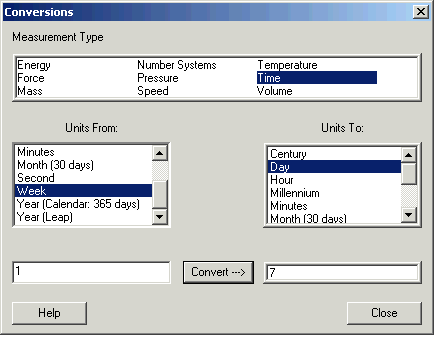
Click the unit you have in the Units From: box, and the units you want in the Units To: box.
Enter the number in the lower left box and click Convert.
This window shows that 1 week is 7 days.
The conversions are based on:
1 millenium = 10 centuries
1 century = 36524.219 days (this is not quite equal to 100 years)
1 year = 365 days
1 leap year = 366 days
1 day = 24 hours
1 hour = 60 minutes
1 minute = 60 seconds
1 month = 30 days
1 week = 7 days