
There are many different units used to measure area: hectare and acre for land, square meter and square feet for buildings and so on.
You can convert an area in one unit to another unit by clicking
Utilities and then Conversions.
Holding the Control key and typing q has the same result.
In the Conversions window select Area.
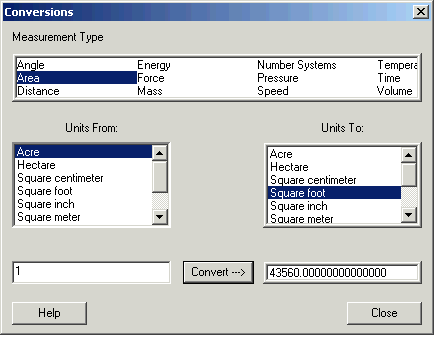
Click the unit you have in the Units From: box, and the units you want in the Units To: box.
Enter the number in the lower left box and click Convert.
The picture shows 1 acre is 43 560 square feet.
The conversions are based on:
1 acre = 0.404 685 64 hectares = 43 560 square feet
1 square foot = 144 square inches
1 square yard = 9 square feet
1 square mile = 640 acres
1 hectare =10 000 square meters
1 square meter = 10 000 square centimeters
1 square centimeter = 100 square millimeters